
You don't need LinkedIn Recruiter to find great candidates on LinkedIn. Recruiter makes it easier, but plenty of agency recruiters fill roles every month with a regular account and a few habits most people never learn.
The free search bar understands Boolean. The filters cover location, current company, past company and industry. And when LinkedIn starts limiting your searches, Google can search LinkedIn profiles for you.
Here's the step-by-step I'd teach any recruiter who doesn't have a Recruiter seat, from the search itself to getting a reply.
Step 1: Use Boolean in the regular search bar
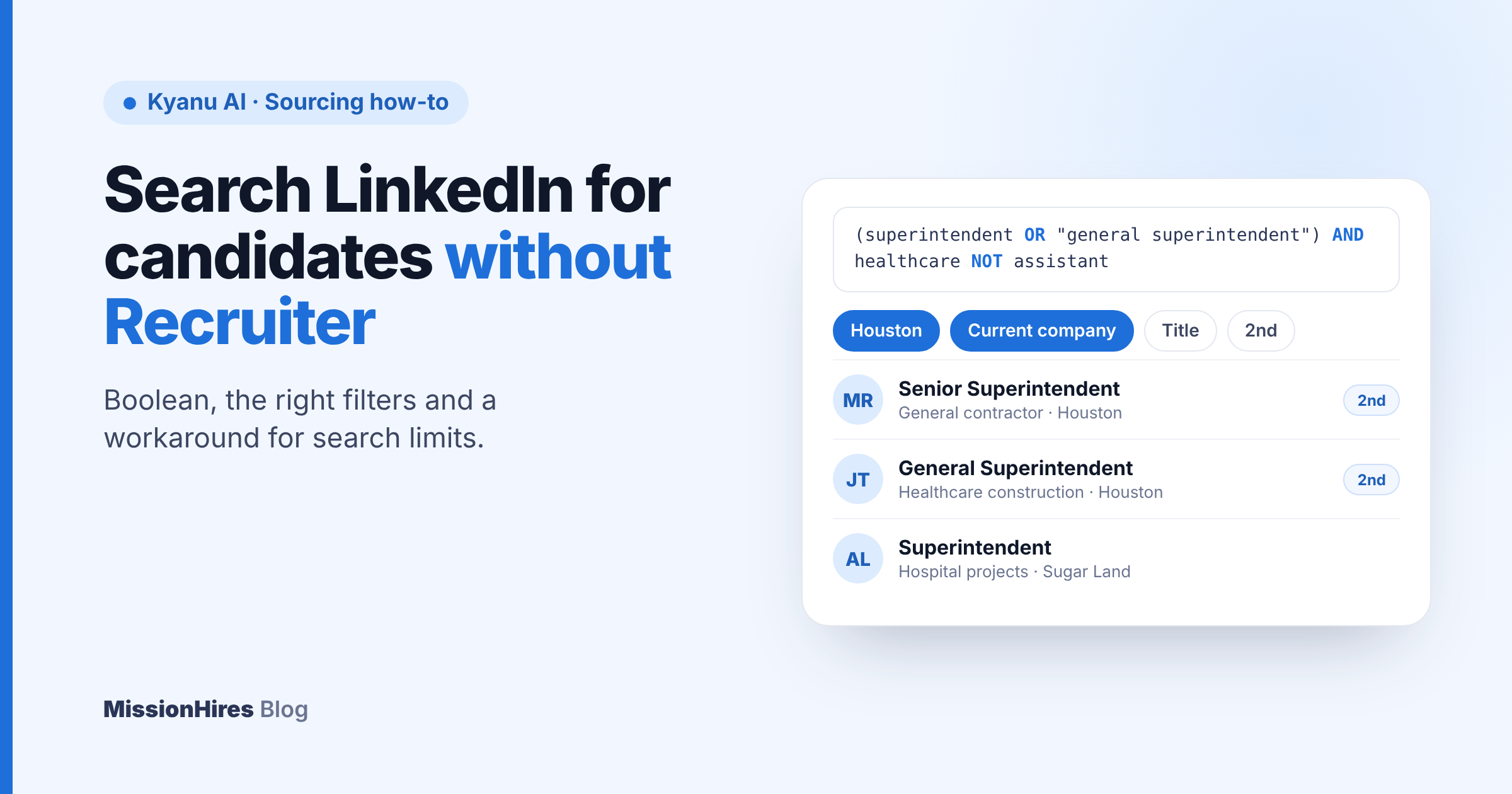
LinkedIn's normal people search accepts AND, OR, NOT, quotation marks and parentheses. The operators have to be in capital letters, and wildcards like * don't work (100Hires).
Type your string in the search bar, press Enter, then click People so you're only seeing profiles.
Three rules that save a lot of frustration:
- Wrap every OR list in parentheses. LinkedIn reads NOT and AND before OR, so without parentheses your search won't mean what you think.
- Type the quotes yourself. Curly quotes pasted from a document can quietly break an exact-phrase search.
- Keep it short on a free account. Free accounts limit how many operators you can use in one search. If a string fails, trim the longest OR list.
Need more strings? Our Boolean search cheat sheet has 16 by role.
Step 2: Use the filters that actually matter
After you search, click All filters. On a free account, these do most of the work:
That last one is a hidden gem. Under All filters, the Keywords section lets you search the Title field on its own. Putting "superintendent" there, instead of in the main search bar, removes everyone who just mentions working with superintendents.
Search by company, not just title
The best LinkedIn searches start from where people work. Make a list of 15 to 20 companies in your market that hire the same kind of person as your client. Then search the title with Current company set to a few of them at a time. You'll get a short list of people with exactly the right background.
Step 3: When LinkedIn limits your searches, use Google
If you search a lot on a free account, LinkedIn eventually decides you're searching for work purposes and caps how many people searches you can run that month. It's the most common reason recruiters think they need Recruiter.
You don't. Google has indexed public LinkedIn profiles, so you can search them from Google with site:linkedin.com/in:
This doesn't count against your LinkedIn search limit. Two things to keep in mind: Google only sees the public parts of a profile, and its copy can be weeks out of date. Always open the profile and check before you reach out.
Our Google X-ray guide has more strings, including ones that find candidates who aren't on LinkedIn at all.
Step 4: Reach people without InMail
Without Recruiter, you have no InMail credits for people outside your network. That's less of a problem than it sounds.
- Send a connection request. Many people accept requests from recruiters in their field. Keep any note short and specific: the role, the location and why them.
- Email them directly. Find a personal email with a contact finder like SignalHire or ContactOut. Email often gets a faster reply than LinkedIn messages anyway.
- Look for the Open to Work frame. People who show it publicly are telling you they want to hear from recruiters.
- Use your 2nd-degree network. A mutual connection can introduce you, and that warm intro beats any cold message.
A connection note that works:
Hi Sarah, I'm recruiting a Senior Superintendent for a hospital project in Houston, $150K plus truck. Your healthcare work stood out. Open to a quick call?
It can be if you send a lot of InMail. If you mostly email or call candidates, a free account plus Google X-ray and a contact finder usually covers what you need.
Your next search
Start with one Boolean string, add Current company and Title filters, and switch to Google when LinkedIn slows you down. You'll be surprised how far a free account goes.
Frequently asked questions
Can you search LinkedIn for candidates for free?
Yes. A free LinkedIn account lets you search people with Boolean operators and filter by location, current company, past company, industry and connection level. Heavy searching can hit a monthly limit.
Does LinkedIn's free search support Boolean?
Yes. It supports AND, OR, NOT, quotation marks and parentheses. Operators must be in capitals, and wildcards don't work.
What happens when you hit LinkedIn's search limit?
LinkedIn caps the number of people searches you can run for the rest of the month. You can keep finding profiles through Google with site:linkedin.com/in searches, which don't count against the limit.
How do I contact candidates on LinkedIn without InMail?
Send a connection request with a short, specific note, or find their email with a contact finder and reach out directly.
Is LinkedIn Recruiter Lite worth it instead?
It can be if you send a lot of InMail. If you mostly email or call candidates, a free account plus Google X-ray and a contact finder usually covers what you need.